 annox
annox
How a review goes
Whoever takes part, a person in their editor or an agent following
along, works on the same plain files. Every action writes one event
to .annox/, next to the document.
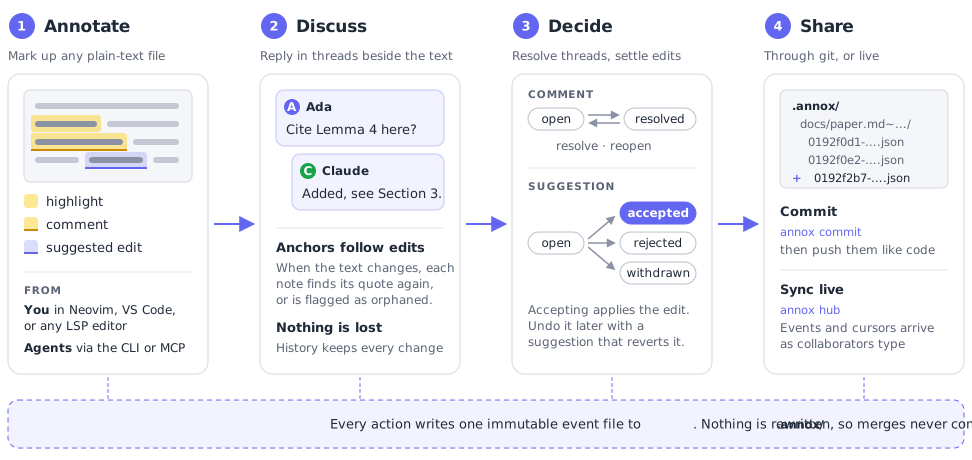
1. Annotate
Highlight a passage, comment on it, or suggest replacing it. Each note is anchored by its position and the quoted text. Drafts can stay local until you publish them. Anchoring (§3)
2. Discuss
Reply in a thread beside the text. When the document changes, each note finds its quote again, or is flagged as orphaned instead of guessing. Every edit to a note stays in its history, and each reader sees which threads others changed since they last looked. Data model (§2)
3. Decide
Resolve a comment, or reopen it. Accept a suggestion to apply the edit, or reject or withdraw it. An accepted edit is undone with a new suggestion that reverts it, so the record stays intact. Suggestions (§4)
4. Share
annox commit commits the new event files, and you push
them like code. Or point the workspace at a hub, and events and
cursors arrive as collaborators type.
Sync (§7)
In your editor
Here it is in Neovim: replying to a comment, commenting on a selection, accepting a suggestion, and suggesting edits as you type.

With an agent
Write @claude in a comment and save. With
annox mcp --channel, the thread is pushed into a running
Claude Code session, which answers with a reply or a suggested edit
that appears in your editor. The agent has its own unread list, so
it never answers itself. Any other agent can follow along with
annox watch, which prints each thread as one JSON line.
# Register the server, then load it as a channel
claude mcp add annox -- annox mcp --author urn:agent:claude \
  --name Claude --channel --mention @claude
claude --dangerously-load-development-channels server:annox
Anyone who can add annotations to the workspace can address the agent, collaborators included, so only use it with people you trust with your session. More in the README